Lab setup
In this lab, we are going to implement network policies for the sample application deployed in the lab cluster. The sample application component architecture is shown below.
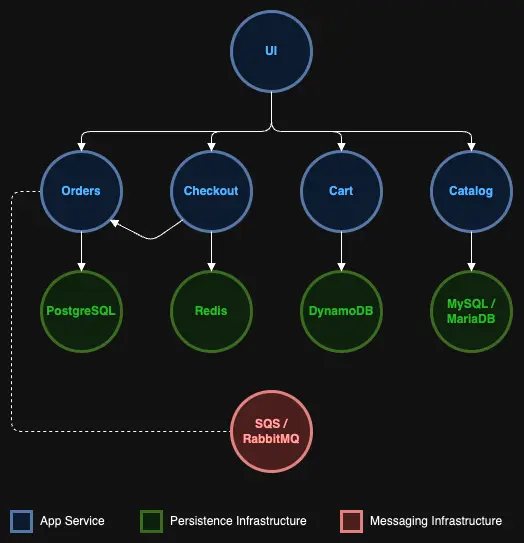
Each component in the sample application is implemented in its own namespace. For example, the 'ui' component is deployed in the 'ui' namespace, whereas the 'catalog' web service and 'catalog' MySQL database are deployed in the 'catalog' namespace.
Currently, there are no network policies that are defined, and any component in the sample application can communicate with any other component or any external service. For example, the 'catalog' component can directly communicate with the 'checkout' component. We can validate this using the below commands:
{"status": "ok",
"info": { "chaos": {"status": "up"
}
},
"error": {}, "details": { "chaos": {"status": "up"
}
}
}
Let us make required configuration changes in our EKS Auto Mode cluster to enable network policies. For that, create a ConfigMap for VPC container network interface (CNI) that provides networking for the cluster.
apiVersion: v1
kind: ConfigMap
metadata:
  name: amazon-vpc-cni
  namespace: kube-system
data:
  enable-network-policy-controller: "true"
This will enable the network policy controller in the vpc-cni plugin
Apply this configuration:
Let's now implement some network rules so we can better control the network traffic flow for the sample application.